Review Comments (0) Screenshots (5) Questions & Answers (0) Votes (19) Awards (14) Wiki  
(19)
Addintools
6.80
www.addintools.com
Shareware
$29.95  Purchase
4 868 people
Download Classic Menu for...

3.82 MBDownloaded 2904 times

This software was checked for viruses 2 months ago and was found to contain no viruses.
Click here to see antivirus report.
 
Video tutorial for Classic Menu for Office 2007 6.5
Frame

Review

This is official description

Brings back your familiar menus and toolbars to Word, Excel, PowerPoint, Access and Outlook 2007. It allows you to work with Office 2007 as if it were Office 2003. Save your time and money for training and tutorials when upgrading to Office 2007.
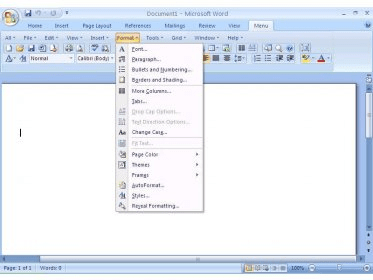
You will see the old toolbars and menus on the ribbon of Office 2007. It make Office 2007 look like 2003, XP and 2000.
 
The following review written by one of the Software Informer contributors applies to version 5.2

Classic Menu for Office 2007 is a great utility to transition from one MS Office version to another. It integrates as an add-in which displays the classic MS Office 2003 Menus (File, Edit, View, etc.) to help users find their way through the new ribbon interface in Office 2007. Not only this, but it also enables the old keyboard shortcuts and supports over 10 languages besides English.
This utility is great because all commands and options have been re-arranged in Office 2007 and as a new user and not used to the distinct arrangement it will result in spending time trying to find what you need. This can be a permanent solution or be left as temporary, while users learn the new tricks of newer MS Office versions; but either way it turns to be handy to access settings and options just as easy as before.
This version allows choosing which Microsoft Office applications it will be installed on, plus it keeps the default ribbon interface and the classic menu is added as an extra tab. In addition, it can now be set to automatically deploy the Classic Menu to multiple computers over a network and can select which users will be able to see the classic menu or not.
Another new feature is enabling or disabling the traditional shortcuts with Alt+Q, to use MS Office 2003 shortcuts or the original ones from Office 2007. Administrators can configure whether to Enable/Disable Classic Menus for all users on a computer.
Definitively worth buying to save time while getting used to the new ribbon interface. Plus the company offers discounts if in the future the customer wants to upgrade to Classic Menu for Office 2010.
  • Adds all of the Office 2003 familiar menus.
  • Switch between the traditional and original shortcuts.
  • For all Office 2007 applications.
  • Multiple language support.
  • Deploy to multiple computers with a single installation.
  • Not customizable.

Reviewed by: Max Santillana

Reviewer rating:

Reviewed: Last year

What's new in version 5.2

This version allows choosing which Microsoft Office applications it will be installed on, plus it keeps the default ribbon interface and the classic menu is added as an extra tab. In addition it can now be set to automatically deploy the Classic Menu to multiple computers over a network and can be select which users will be able to see the classic menu or not.
Another new feature includes enabling or disabling the traditional shortcuts with Alt+Q, to use MS Office 2003 shortcuts or the original ones from Office 2007. More so Administrators, can configure whether to Enable/Disable Classic Menus for all users on a computer.
Report a wrong version Report a wrong program title Suggest a correction

Screenshots

Main window Main window Installation Installation Menu selection Menu selection Word Menu Settings. Word Menu Settings.
All 5 screenshots

Latest comments


There are no comments, be the first one!
Add new comment

E-mail Address:

Password:

Register now »

Forgot password?

Sign in with:
Download Software Informer Client
Copyright © 2012, Informer Technologies, Inc. About| Privacy and terms| Help| Feedback & Support| Partners program